Tesla Model 3: Folding Mirrors
***
Relevant Background : “
Adjusting Exterior Mirrors
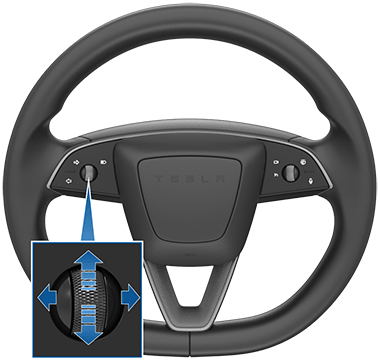
Adjust the exterior mirrors by touching . Press the left scroll button on the steering wheel to choose whether you are adjusting the Leftor Right mirror. Then use the left scroll button as follows to adjust the selected mirror to its desired position:
- To move the mirror up or down, roll the left scroll button up or down.
- To move the mirror inward or outward, press the left scroll button to the left or right.
Both exterior mirrors can tilt downward when the vehicle is shifted into Reverse. To turn this feature on or off, touch . To adjust the auto-tilt position, touch Adjust Tilted Position and make mirror adjustments as needed. After adjusting the tilted position and touching Save, mirrors will automatically tilt to the configured position whenever you shift into Reverse. When you shift out of Reverse, mirrors tilt back to their normal (upward) position. Mirror Auto Tilt must be enabled to adjust tilted position.
To reduce glare when driving at night, the rear view mirror and exterior side mirrors dim automatically. To enable or disable this feature, touch .
Availability of Mirror Auto Dim depends on configuration, market region, and date of manufacture.
Folding Mirrors
To manually fold and unfold exterior mirrors (for example, parking in a narrow garage, tight space, etc.), touch . You can also fold and unfold mirrors using the multifunction capabilities on your left scroll button (see Left Scroll Wheel Customization).
When you manually fold the mirrors, they remain folded until your driving speed reaches 50 km/h (or until you manually unfold them by touching ).
To set the mirrors to fold automatically whenever you exit and lock Model 3 touch . The mirrors unfold automatically when you unlock Model 3.
You can also set mirrors to fold automatically whenever you arrive at a specific location, which saves you from having to manually fold them each time you arrive at a frequented place. To set up, stop at the location you want to save (or drive at less than 6 km/h), and fold the mirrors. Touch Save Locationwhen it appears briefly on the Fold Mirrors control.
If you no longer want mirrors to automatically fold, touch when they fold at the saved location and then touch Remove Location.
When you leave the saved location, mirrors unfold when your driving speed reaches 6 km/h, or when you touch .
- More Resources:App: https://www.youtube.com/@numbrs3254 App Support Site: https://tekk-savvy.com Book: https://www.amazon.com/dp/B08835PX1P 3D Print Shop: https://www.flickr.com/gp/140115623@N05/y5YXF00LU8 Blog: https://jotformk.wixsite.com/ncyclopedia Hand Made Products Shop: https://www.etsy.com/ca/shop/Tekksavvy Blogger: https://www.blogger.com/profile/07524401563605547321 Shopify shop: https://tekks-shop.myshopify.com Ringtones: https://www.zedge.net/profiles/357e11a5-25fb-4415-9a6a-7da2239c2aba/ringtones Beats: https://air.bi/9D6GV Excel Templates & Calculators: https://youtu.be/-8XdrnnlNuE Tax Calculators: https://youtu.be/bzq9D0fccqESkype ID: ptlb0142_1Stock Broker Referral Link: https://portal.ingotbrokers.com/en/accounts/open-account/individual/eyJncm91cF9pZHMiOlsxNzU2Ml19Freelancer Referral Link: https://www.freelancer.com/get/ptlb0142?f=giveSkip The Dishes Courier: Referral Code: 6S69IH Uber Eats Driver: Referral: ubaidp147ue Instacart Shopper - Referral Code: TSAVVY9010D Poparide Referral Link: https://www.poparide.com/r/ubaidp Lending Loop Referral Code: 42a817


Comments
Post a Comment