Tesla Model 3: Services & Lights
***
Relevant Background: “
High Beam Headlights
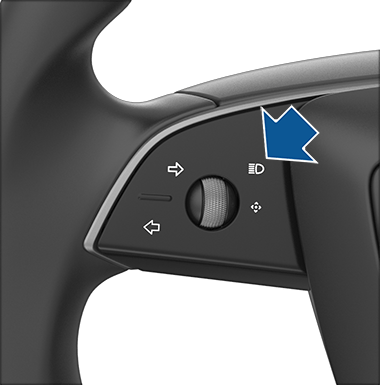
Use the high beam headlight button on the left side of the steering wheel to control the headlights:
- Press and quickly release to flash high beam headlights.
- Press and hold to turn on high beam headlights - touchscreen displays a brief timer and you must hold for the duration of the timer to latch the high beam headlights to the on position. When headlights are on, press the button a second time to turn them off.
The following indicator lights are visible on the touchscreen to show the status of the headlights:


The Maintenance Summary displays the following:
- The last time each maintenance action was performed, if ever
- Which actions are overdue
- Which actions are due soon
- Which actions are due in a while
- A brief description of each maintenance action
Maintenance Summary allows you to record that there has been a maintenance action, which resets the maintenance interval, if applicable.
Note: Although Tesla may update the Maintenance Summary during a service visit, it is the responsibility of the vehicle's owner to ensure the accuracy of the information, especially for maintenance performed by Independent Repairers or through do-it-yourself means.
Cabin Air Filter
Your Tesla vehicle is equipped with an air filter that prevents pollen, industrial fallout, road dust and other particles from entering through the vents.
Schedule may be different depending on the environment. To check if your vehicle needs cabin air filter replacement and for the latest recommended schedule, tap ‘Controls’ > ‘Service’ > ‘Maintenance’ on your vehicle touchscreen.
Note: To access this feature, the vehicle must have software version 2024.44.25 or later.
We recommend the following cabin air filter replacement schedule:
Cybertruck is not fitted with a standard cabin air filter.
High Efficiency Particulate Air (HEPA) Filter
If your Tesla vehicle is equipped with HEPA, we recommend replacing the HEPA filter and the carbon filter every 3 years.
For Cybertruck, we recommend replacing the HEPA filter every 2 years or every year in cases of off-road or dirt road driving.
Schedule may be different depending on the environment. To check if your vehicle needs HEPA filter replacement and for the latest recommended schedule, tap ‘Controls’ > ‘Service’ > ‘Maintenance’ on your vehicle touchscreen.
Note: To access this feature, the vehicle must have software version 2024.44.25 or later.
Tire Rotation
Aggressive driving can lead to accelerated tire wear and may require more frequent tire service. Tire rotation helps maintain even treadwear amongst your Tesla vehicle’s tires which can help maximize overall tire life. We recommend rotating your tires every 10,000 km or if the difference of tread depth between two of your tires is 1.5 mm or greater, whichever comes first.
Wheel Balancing
Wheels that are unbalanced can impact handling, tire life and steering components. Wheel balancing is a service that ensures an even weight distribution within your vehicle’s tire and wheel assembly. We recommend scheduling wheel balancing for your Tesla vehicle, as needed. Your Tesla vehicle may require a wheel balancing service if you notice any vibration in the steering wheel while driving.
Wheel Alignment
Misaligned wheels can also impact handling, tire life and steering components. Wheel alignment is a service that ensures that your vehicle’s tires are positioned correctly. We recommend scheduling wheel alignment for your Tesla vehicle, as needed. Your Tesla vehicle may require a wheel alignment if you notice any of the following:
- Uneven wear on your tires
- Vehicle pulls left or right while the steering wheel is held straight
Wheel alignment is also recommended after installing a new set of tires on your Tesla vehicle.
Tire and Wheel Configuration
If your vehicle’s tires and/or wheels were recently serviced, we recommend resetting the tire and/or wheel configuration to improve the driving experience.
Reset the tire and/or wheel configuration in your vehicle touchscreen by following these steps:
- Tap ‘Controls.’
- Tap ‘Service’ > ‘Wheel & Tire.’
- To reset the tire configuration, tap ‘Tires.’
- To reset the wheel configuration, tap ‘Wheels.’
Refer to tire manufacturer's owner manuals and warranty documentation for additional details.
Brake Fluid Test
We recommend testing your brake fluid for contamination by scheduling a Tesla service appointment every 4 years and replacing as needed.
Note: Heavy brake usage due to towing, mountain descents or performance driving – especially for vehicles in hot and humid environments – may require more frequent brake fluid checks and replacements.
Air Conditioning Service
Air conditioning service replaces the A/C desiccant bag for better longevity and efficiency of your air conditioning system.
A/C desiccant bag replacement is still recommended for Tesla vehicles without heat pumps. View if your vehicle is equipped with a heat pump by tapping ‘Controls’ > ‘Software > ‘Additional Vehicle Information’ on your vehicle touchscreen. If your vehicle is equipped with a heat pump, check if your vehicle needs A/C desiccant bag replacement and the latest recommended schedule by tapping ‘Controls’ > ‘Service’ > ‘Maintenance’ on your vehicle touchscreen.
We recommend the following air conditioning service schedule:
Windshield Camera Area Precision Cleaning
Cleaning the inside of the windshield in the camera area is vital for clear visibility and optimal camera function. When needed, we recommend scheduling a service appointment to have the inside of the windshield cleaned. To check if your vehicle needs cleaning for the windshield camera area, review the Maintenance Summary by tapping ‘Controls’ > ‘Service’ > ‘Maintenance’ on your vehicle touchscreen.
Winter Care
We recommend cleaning and lubricating all brake calipers every 12 months or 20,000 km if you’re in an area where roads are salted during winter.
If your high voltage battery requires maintenance, your vehicle will alert you by displaying a message on the vehicle touchscreen indicating you should schedule a service visit.
The high voltage battery system must be serviced only by a trained technician. Under no circumstances should you open or tamper with the battery. Do not disassemble, remove or replace high voltage components, cables or connectors.
Schedule a service visit in the Tesla app.
1 For Model S and Model X vehicles produced in 2012-2020, we recommend replacing the cabin air filter every 2 years.
2 We recommend A/C desiccant bag replacement for Tesla vehicles without heat pumps. For Model S vehicles produced in 2012-2020, we recommend replacing your A/C desiccant bag every 2 years. For Model 3 vehicles produced in 2017-2023 without heat pumps, we recommend replacing your A/C desiccant bag every 6 years. For Model X vehicles produced in 2015-2020” (https://www.tesla.com/en_ca/support/vehicle-maintenance)
***
- More Resources:App: https://www.youtube.com/@numbrs3254 App Support Site: https://tekk-savvy.com Book: https://www.amazon.com/dp/B08835PX1P 3D Print Shop: https://www.flickr.com/gp/140115623@N05/y5YXF00LU8 Blog: https://jotformk.wixsite.com/ncyclopedia Hand Made Products Shop: https://www.etsy.com/ca/shop/Tekksavvy Blogger: https://www.blogger.com/profile/07524401563605547321 Shopify shop: https://tekks-shop.myshopify.com Ringtones: https://www.zedge.net/profiles/357e11a5-25fb-4415-9a6a-7da2239c2aba/ringtones Beats: https://air.bi/9D6GV Excel Templates & Calculators: https://youtu.be/-8XdrnnlNuE Tax Calculators: https://youtu.be/bzq9D0fccqESkype ID: ptlb0142_1Stock Broker Referral Link: https://portal.ingotbrokers.com/en/accounts/open-account/individual/eyJncm91cF9pZHMiOlsxNzU2Ml19Freelancer Referral Link: https://www.freelancer.com/get/ptlb0142?f=giveSkip The Dishes Courier: Referral Code: 6S69IH Uber Eats Driver: Referral: ubaidp147ue Instacart Shopper - Referral Code: TSAVVY9010D Poparide Referral Link: https://www.poparide.com/r/ubaidp Lending Loop Referral Code: 42a817


Comments
Post a Comment